
How to create flashcard decks in ChatGPT or Claude

If you’re anything like me, at times you spend as much time figuring out how to study languages as you do actually studying them. It can be a bit paralysing. It’s often worth taking the plunge and doing whatever feels fun — but then you wonder, “Am I just spinning my wheels?”
Over the years, I’ve refined my system a lot. I talk to people, listen to podcasts, and use flashcards for prep and review. The flashcards bit is the most annoying: I have to figure out what I want to study, make sentences, make the cards, record audio, and then actually study.
So I decided to do that work through ChatGPT or Claude, and make an app where I could say, “Make a bunch of flashcards for me to review how to order ice cream in Italian,” and have them ready to study.
And I finally did it. I released Grandmaster Flash a few days ago. It’s available for iPhone and iPad; the Android version is in progress. This is my app, built around how I learn languages.
Contents
Start with something you actually want to say
You don’t need to ask for a generic “beginner Italian” course. Tell the assistant what’s happening in your life. Here are some examples.
Welcoming your mother-in-law in Korean
Using Grandmaster Flash, make a Korean deck for me. My Korean is rusty and my mother-in-law is visiting. Help me review phrases about eating food and resting in our home. I want to be polite and welcoming. Use common spoken Korean, explain the polite forms, and add English translations and Korean audio. Ask me how I address her if it changes the wording.
Introducing yourself in Italian
Using Grandmaster Flash, make a deck to help me introduce myself and talk about what I do in Italian. Ask me about my work and interests first, then make short phrases I’ll actually say. Include English translations and Italian audio.
Learning vocabulary from a song
I’ve attached an excerpt from the lyrics of “Idilio” by Willie Colón. Using Grandmaster Flash, make a Spanish vocabulary deck from it. Choose words and expressions at intermediate level or above, explain their meaning in context, and write short original example sentences. Add English translations and audio with a Colombian accent. Tell me if you can’t find a voice that matches.
For that last example, attach the text you want to work on. A song title alone doesn’t give the assistant the passage you mean. You can do the same with a screenshot of an article or notes from a lesson.
Badabing, badaboom. The assistant makes the cards, Grandmaster Flash uses ElevenLabs to generate the audio, and the deck lands in your library. You open the app and study.
Watch an illustrated example: a request becomes a deck
Illustrated chat example. The assistant’s wording and timing vary.
Using Grandmaster Flash, make six Italian flashcards for ordering gelato, with English translations and Italian audio.
ChatGPT or Claude, using Grandmaster Flash
- Choose short phrases for ordering, choosing flavours and paying.
- Create the Italian deck and save the cards.
- Generate audio for the saved phrases.
- Check that the cards and audio are ready.
Open Grandmaster Flash and sync. Your deck is ready to download and study.
1. Install Grandmaster Flash
Download Grandmaster Flash from the App Store and sign in with your email address. Enter the code from your inbox. New accounts also need to accept the app’s terms.
Use the same email address when you connect your assistant. That’s how the app and the assistant find the same private library.
2. Connect your assistant once
The connection lets ChatGPT or Claude save cards in Grandmaster Flash. Without it, the assistant can write a table of vocabulary in the chat, but the table won’t automatically become a deck in the app.
Both assistants use this server address:
https://api.grandmasterflash.app/mcpIn Claude
Claude supports custom connectors on its free and paid plans; the free plan allows one custom connector. Start on claude.ai.
- Open Customize → Connectors, then choose the option to add a custom connector. Depending on the interface, this appears as + Add → Add custom connector or Add → Custom → Web.
- Name it Grandmaster Flash, paste the server address above, and continue.
- Keep OAuth sign-in. If Claude asks for an OAuth client, choose Register automatically. Leave request headers empty.
- Connect and sign in with the same email you used in the app. Enter the emailed code and approve access.
- In a chat, open the + menu, choose Connectors, and enable Grandmaster Flash.
For screen-by-screen help, use the Grandmaster Flash connection guide. Anthropic’s connector guide covers the account and organisation requirements.
In ChatGPT
You need a ChatGPT workspace that allows custom connections with write actions, because saving a deck creates data. Grandmaster Flash’s ChatGPT connection currently requires an eligible Business, Enterprise, or Edu workspace. If your personal plan can’t create decks through the connection, use Claude.
- Open ChatGPT’s Plugins page on the web. Your workspace admin may need to enable the connection or add it for you.
- Choose the + button, then Add custom MCP server.
- Name it Grandmaster Flash and enter the server address above. Choose OAuth authentication.
- Review the connection notice, create the plugin, and complete sign-in using your app’s email address. Review the tools ChatGPT finds, then install the resulting plugin.
- Start a chat, type @, and select Grandmaster Flash. Approve the requested actions when ChatGPT asks.
OpenAI describes that interface in its current connection instructions. Some accounts still show the older Settings → Apps → Create flow with Scan Tools. The Grandmaster Flash guide also covers that flow.
3. Ask for a small, specific deck
Start with something you’ll use soon. Six phrases for buying gelato make a better first test than 500 Italian words you might need someday.
Using Grandmaster Flash, make a small Italian deck for ordering ice cream at a gelateria. Start with six short phrases: ordering a small cone, choosing two flavours, asking for pistachio and chocolate, asking about flavours without milk, checking the price, and paying by card. Include natural English translations and Italian audio.
Tell the assistant your level and the region or accent you want. That gives it a better starting point than the language name alone.
For personal material, tell the assistant to ask questions first. It needs to know what you do before it can write a deck about your job. If speaker gender affects the wording, say whose voice and grammatical forms you want.
This is the same idea as following your curiosity in language learning: start with a real question, then keep the expressions you want to remember.
4. Check the cards, add audio, and sync
Read the proposed phrases in the chat. Check that they mean what you intended and suit the person you’re speaking to. You can ask for changes before you save them.
Show me the proposed cards first. Keep each card short, use everyday spoken Italian, and remove anything that repeats the same meaning. Once I’m happy with them, save the deck in Grandmaster Flash and generate the Italian audio.
If the assistant has already saved the cards, you can still ask it to edit them. Choose the wording before generating the audio where possible, because changing the spoken text needs new audio.
When the assistant says the deck and audio are ready, open Grandmaster Flash. Let it sync; if the deck hasn’t appeared, use Settings → Sync now. Check that both the app and connector use the same email.
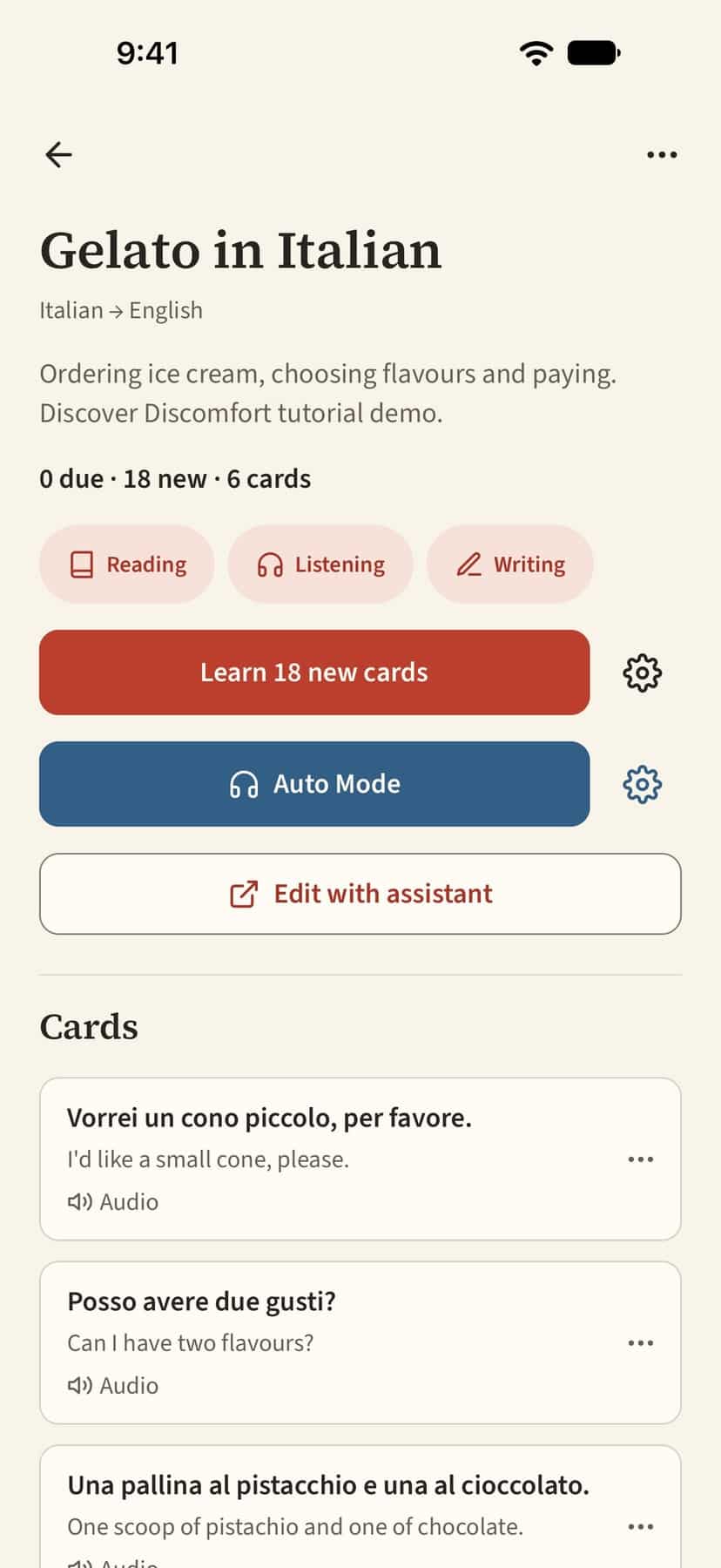
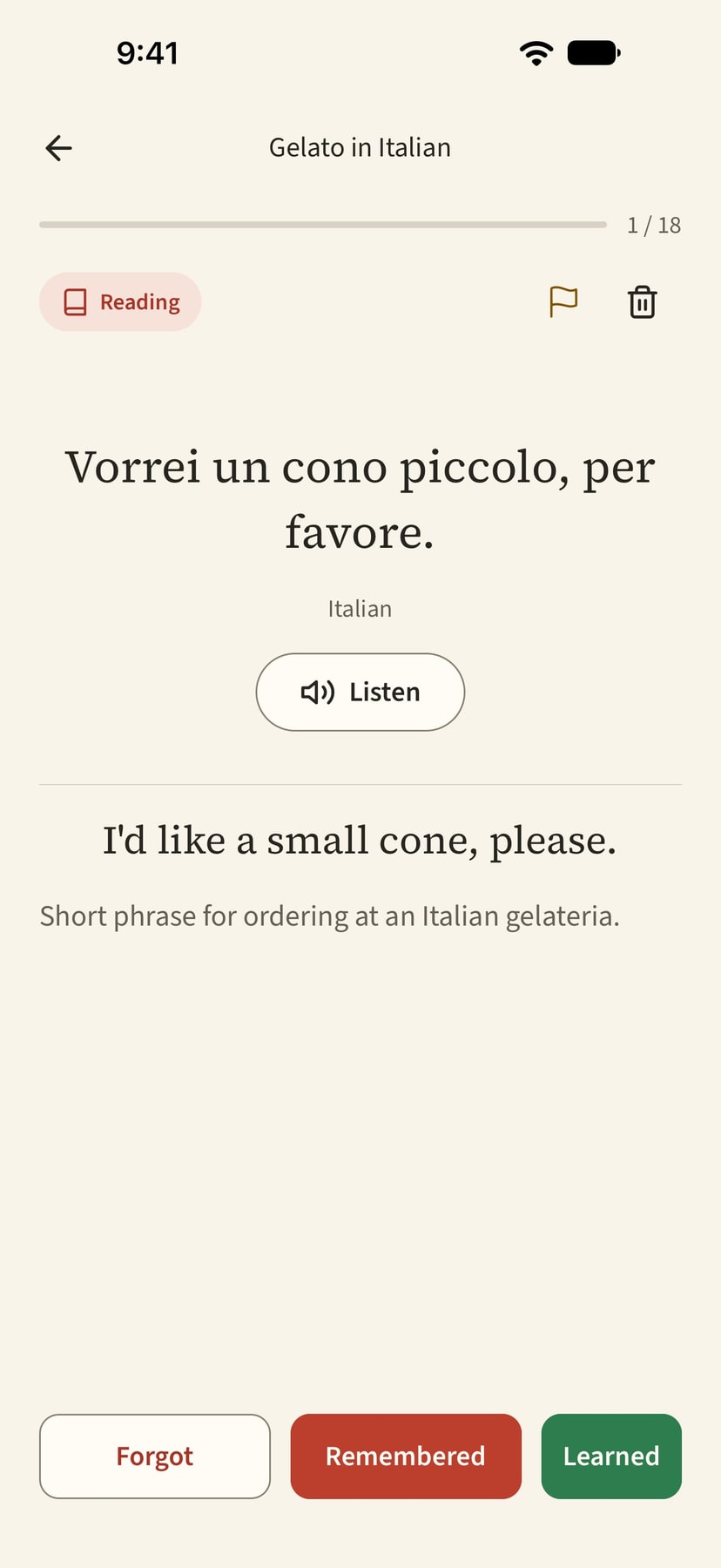
The screenshots show a six-card Italian demo deck with supplied speech audio. You can ask your assistant to generate audio for your own decks.
Wait for the audio to download before going offline. Once it’s on your device, you can study without a connection; your reviews sync when you reconnect.
5. Study, then fix anything that needs work
Open the deck and start a study session. Try to recall the answer before you reveal it. Choose Remembered if you got it, or Forgot if you didn’t. The app brings missed cards back sooner and leaves longer gaps for cards you remember.
Reading, listening, writing, and speaking have separate schedules. You assess your own writing and speaking. If you want hands-free listening, Auto Mode plays downloaded deck audio; it doesn’t grade your answers or change your review schedule. Ask for audio on both sides of the cards for that mode.
If a card sounds strange, flag it in the app and ask your assistant to check it. For example:
Review my flagged cards in Grandmaster Flash. Check the Italian for everyday spoken usage, explain your proposed changes, then update the cards I approve and regenerate any affected audio.
AI and generated speech can make mistakes. For a phrase you’re unsure about, check with a teacher or someone who speaks the variety you’re learning. I cover the broader strengths and limits in my guide to AI for language learning.
What’s free, and what costs money?
Flash Free includes unlimited decks and text cards, offline study, and sync. It also includes a one-time allowance of 6,000 characters of generated audio and 100 MB of audio storage. Replaying audio you already have doesn’t spend that allowance.
Flash Plus raises that to 18,000 generated-audio characters a month and 1 GB of audio storage. You can pay monthly or annually through the App Store. Check Settings → Plan & usage for your local price and current limits. Your ChatGPT or Claude plan is separate.
If you already have an Anki setup you like, our Anki language-learning guide covers that approach. I built Grandmaster Flash for learners who want to make and revise decks in a chat and study them on their phone.


